Connect Copilot Studio to Guard.ch
Let Copilot Studio open and interact with websites in an isolated cloud browser. Watch live or hand over a running session.

Connect Copilot Studio
Use an agent in Microsoft Copilot Studio with permission to add tools. Your environment's data policies must allow the connector.
1. Add the connection
On your agent's Tools page, choose Add a tool › New tool › Model Context Protocol. Enter guardch as server name, a short description and this URL as server URL, choose OAuth 2.0 › Dynamic discovery and click Create.
Agent > Tools > Add a tool > New tool > Model Context Protocol
Copy each value into the matching field.
- MCP server URL
https://api.guard.ch/mcp- Name
guardch- Description
Control an isolated Guard.ch browser- Authentication
- OAuth 2.0
- OAuth type
- Dynamic discovery
Show screenshot
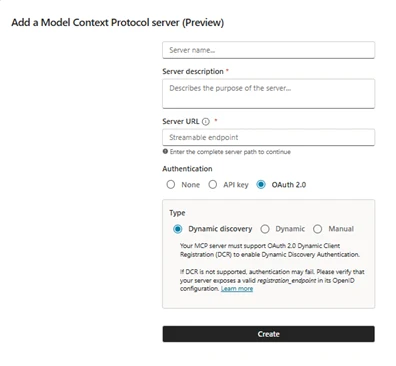
Official example. Use your values above; the example may show a different server or interface version. Screenshot source 2. Sign in and allow access
Click Next, then in Add tool choose Create a new connection and sign in on the Guard.ch page that opens. Finish with Add to agent.
Create > Next > Create a new connection > Add to agent
3. Try it in a new chat
Send the task below in the Test pane. If the agent asks to connect, open the connection and sign in to Guard.ch first.
Test your agent
Open example.com in a Guard.ch browser and tell me what the page says.
0 of 3 steps marked done
Need help?
If the connection is blocked, a data policy in your Power Platform environment restricts the connector; ask your admin to allow it.
Hand over a running session
Choose “Hand off to an agent” in the Guard.ch viewer and paste the prepared prompt into your assistant’s chat. The session ID in that prompt lets the assistant continue in the same browser. Sign your assistant in with the same Guard.ch account.